Branches, Pull Requests, and Issues
When working with others, it's usually not a good idea to have everyone work on the main repository as it can easily result in conflicts.
Merge conflicts happen when multiple people update the same part of a file and one of them tries to merge in the other's work.
Branches and pull requests exist to mitigate the risk of merge conflicts.
This article will cover the following topics:
- What is a branch?
- Creating and accessing branches
- Opening and closing PRs
- Resolving merge conflicts
- GitHub Issues
What is a Branch?
Branches are essentially copies of the repo with their own commit histories. New repos start with a default branch, usually called main. All commits are put on the default branch until a new branch is created.
Creating and accessing branches
The main command used to interact with branches is git checkout <branch>, which will switch your current branch to <branch>. Branches can be created with git checkout -b <branch>, which will start a new branch from the current branch you are on when you run the command.
Opening and closing PRs
Pull requests (PRs) allow changes from one branch to be merged into another branch.
To open a new PR, click the pull requests tab on the GitHub web interface and then click New pull request.
On this page you can select the source branch and the branch the changes will applied to.
From here, please describe your changes in the provided text box for reviewers.
After this, your changes must be approved by a reviewer and pass any automated checks before it can be merged.
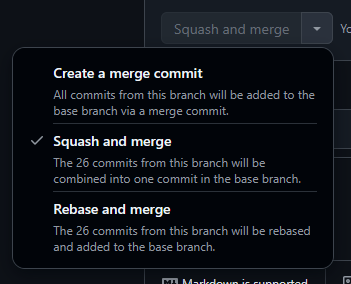
There are three ways to merge a PR (as shown in image below):
- Merge: All commits in the PR are added separately
- Squash and Merge: All commits in the PR are put into one commit on the receiving branch
- Rebase and Merge: Adds your commits as if they were always part of the receiving branch.
Organizing Projects with Issues
Issues (found under the Issues tab) are a way for developers to communicate between themselves, other teams, and users.
Typical uses for issues include feature requests and bug reports; COMPASS also uses issues to organize tasks.
Issues should be given a Label (feature request, bug, task, etc.) and then completed.
Please make sure that your issue is as descriptive as possible to minimize the number of clarifying questions needed.